
How to restore a deleted issue in Jira Cloud
The short answer: Jira Cloud can't undo a delete. When a work item (issue) is deleted, Jira removes it with its comments, attachments, worklogs and history, and there's no trash to restore it from. Before you give up, check that it was really deleted. Then see what you can still recover, and make sure the next one can be restored.
First, check that it was really deleted
Plenty of "deleted" issues are still there.
- It was moved to another project. Moving a work item gives it a new key. Open the old key's address (
your-site.atlassian.net/browse/ABC-123): Jira sends you on to the work item under its new key. - It was archived. On Jira Premium and Enterprise, archived work items drop out of boards and search results. A Jira administrator can find them in the list of archived work items and restore them.
- A board or filter hides it. Boards hide work items that don't match their filter, and many hide done work after a while. Search for it directly: in Jira's search, try
key = ABC-123, orsummary ~ "a few words from the title". - You can't see it any more. Jira's message "the work item doesn't exist or you don't have permission to view it" covers both cases. A permission change or a security level may be hiding it from you. Ask a project administrator to look it up.
If none of those find it, the work item was deleted.
If it was deleted: your options
Restore it from a backup
Atlassian's backup tools work on whole sites, not single work items. Restoring a backup over your live site would also roll back everything your team has changed since it was taken, so in practice you'd restore it into a separate test site, find the work item there, and copy its content back by hand. That's slow, it brings back a copy rather than the original, and anything added after the backup is missing. It's only worth it for something important, and only if a recent backup exists.
Rebuild it from what's left
The content often survives in other places:
- Email notifications. Jira's notification emails include the summary, the description and new comments. Search your inbox, or ask the people who were watching it, for the work item's key.
- Links from other work items. Linked work items lose the link when one side is deleted, but their comments and descriptions may quote it.
- Chat and wiki. Slack, Microsoft Teams or Confluence pages that mention the key often quote its summary or description.
- Exports and reports. A recent CSV export, dashboard or sprint report may list its fields.
Create a new work item, copy back what you find, and note the original key in a comment so people searching for it can find the new one.
Ask Atlassian Support
Atlassian Support can tell you what's possible on your plan. Don't count on getting a single work item back.
Make the next deleted work item restorable
Nothing can restore a work item that wasn't captured before it was deleted, so the time to set up a recycle bin is before you need one.
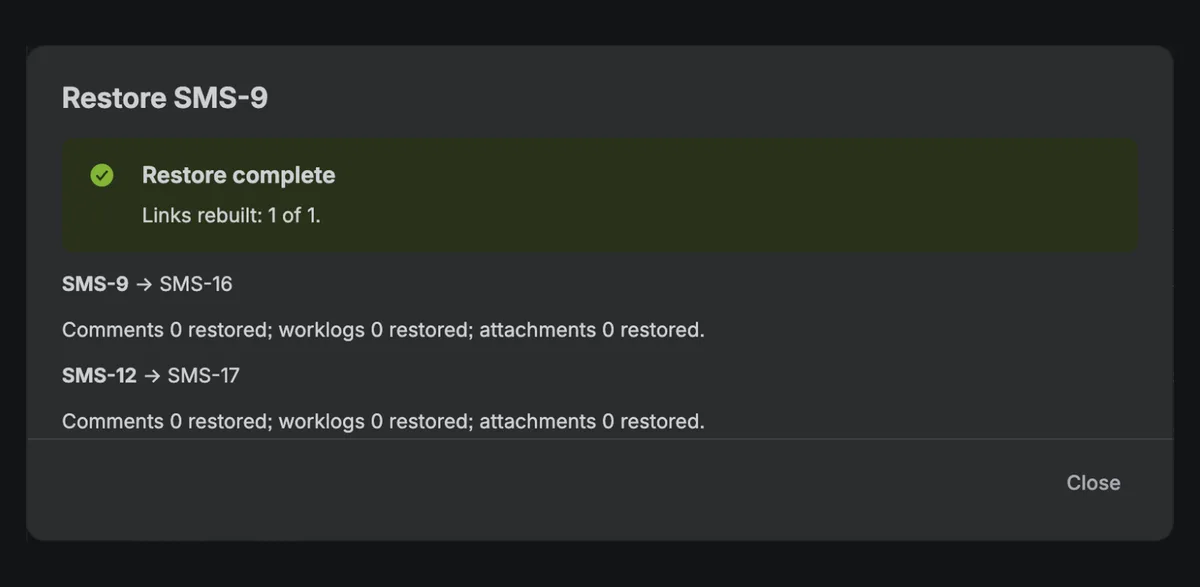
NPRecycle adds a recycle bin to Jira Cloud. It keeps a copy of your work items as they change. When one is deleted, it appears in the recycle bin under Jira settings → Apps → NPRecycle, showing who deleted it and when, and a Jira administrator can restore it in a few clicks:
- with its sub-tasks, in its original status
- with its fields, including custom fields
- with its comments and worklogs, noting their original authors and dates
- with its links to other work items, rebuilt in the right direction
- with its attachments, byte for byte
Before you restore, a preview shows exactly what will come back. See how it works, or get it from the Atlassian Marketplace.
Make deletion less likely
- Limit who can delete. In a company-managed project, the Delete work items permission is set in the project's permission scheme (Project settings → Permissions). Many teams give it only to project administrators. In a team-managed project, check what each role allows under Project settings → Access.
- Archive instead of deleting. On Jira Premium and Enterprise, archiving takes a work item out of the way and can be undone.
- Be careful with bulk changes. One bulk change can delete hundreds of work items at once. Check the search results before you start.
- Check your automation rules. A rule with a delete action and a too-broad condition can remove work items without anyone noticing. Review who can edit rules, and test new ones on a small project.
Frequently asked questions
Can a Jira administrator recover a deleted issue?
Not with Jira alone. Jira Cloud has no recycle bin, so even site administrators can't bring back a single deleted work item. With a recycle bin app such as NPRecycle installed beforehand, a Jira administrator can restore it with its sub-tasks, comments, worklogs, links and attachments.
Can I undo a delete in Jira?
No. Jira Cloud has no undo for deleting a work item, and it asks for confirmation instead. Atlassian's feature request for a recycle bin, JRACLOUD-36415, has 700+ votes.
Can I recover work items deleted by a bulk change or automation rule?
Not with Jira alone. With NPRecycle installed, every work item deleted after installation appears in its recycle bin, however it was deleted: one at a time, by a bulk change, by an automation rule or by another app.
How do I find out who deleted an issue in Jira?
With NPRecycle installed, the recycle bin shows who deleted each work item and when, and Settings → Audit log exports the full list to CSV.
Are deleted Jira issues kept anywhere?
No. Once Jira Cloud deletes a work item, it's gone from your site, with its comments, attachments, worklogs and history. Only a copy made beforehand, in a backup or by an app like NPRecycle, can bring it back.